Search Box

Showing posts with label computer tips. Show all posts

Sunday, November 17, 2013

How to create sitemap to your website ?

Hello guys i have come back take a new topics. Today i will showing how to create your website sitemap. Sitemap is very important for a website. If you create sitemap, you site pages will be indexing quickly. So, now you will seeing how to create your website sitemap.


Now you go to site map generator site (www.xml-sitemaps.com/‎) and create sitemap fast. When you go to site map generator site then you will seeing some option. Just you put your site address and click start button. No change any option. After click start button your sitemap create within a few second. 

How to add your website in Google webmaster tool ?

Hello guys i have come back take a new topics that are very important for a website owner. First time when you create a website then you need indexing your website in google, yahoo, being. Cause when a visitor search a topics in google,yahoo,being then these visitor will finding your site first. So if you want to huge visitor to your site, You will adding your site in google webmaster tools, yahoo webmaster tools, being webmaster tools. Today i have shown you how to add your website in google webmaster tools.

Monday, July 29, 2013

100 Free Job Post Site List For USA & UK

Now a days most of people search popular job posting site. For this reason i have posted this job post site list for everyone that you can easily use this site.

Sunday, March 17, 2013

How to format your pen drive?


When you try to simply  format to your pen drive but you can’t give format to your pen drive. Who can’t give format to your pen drive? They follow this tips.

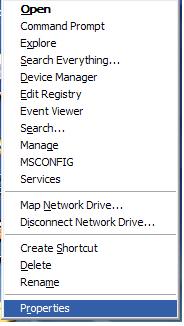
First you go to your computer desktop and then you right click over “My Computer” option. After click over my computer you will click manage option then you see this interface.

Friday, January 11, 2013

How to change mouse pointers?


Firstly you click start button then you go all programs and click control panel. 


When you click control panel then you see this interface.


When open the control panel then you select mouse option and click. 


When you click mouse option will be open then you select pointers. 


After select pointers you can select any mouse pointers. You will select a mouse pointers and then click apply and ok.


Pointer option


You can spread you mouse pointer here or you change display pouters trials.

Wheel option


You can change number of lines to your wheel here. After change wheel line you click apply and ok. 

Tags: Computer tricks, Computer Tech, Computers tips, how to change you mouse pointers, change mouse option, change your mouse pointers, Change mouse wheel