Search Box

Showing posts with label Excel 2010 oDesk Test Answer 2013. Show all posts

Saturday, March 9, 2013

How to turn off automatic update windows to your computer?


Firstly you go my computer option and click right button over my computer option

then you click properties option. After click properties option you select automatic update option.

Sunday, March 3, 2013

MS Word 2007 oDesk Test Answers 2013


1.  Which among the following methods would you select when you want to add protection to parts of a template?
Ans:  Go to the Developer tab, click on Properties in the Controls group and then click any of the Locking options in the Content Control Properties dialog box.

2. Which of the following is/are true about phishing?
Ans: All if the above

3. This question is based upon the figure shown below

In some cases, when lists are combined into one "List," the formatting is not updated. Refer to the picture given above. Which among the following options should be used to update this formatting?
Ans: D

4. Which among the following charts do not have axes?
Ans: Doughnut charts

5. Microsoft named two styles that work in Word 2007 as both character and paragraph types as being ______ styles:
Ans: Linked

6. This question is based upon the figure shown below

 Ans: It ensures that the text is not obscured by binding.

7. With the help of which view will the Watermark not be seen?
Ans: Web Layout view

8. This question is based upon the figure shown below

How will the Message Bar alerts be enabled as shown in the given picture?
Ans: Select Word Options from the Microsoft Office Button. Click on Trust Center , then click Trust Center Settings, and then click Message Bar.
9. Which among the following is not a Bookmark option to sort the list of bookmarks in the document?
Ans: Author

10.  This question is based upon the figure shown below

 Why is the "Different First Page" option used in the Page Setup dialog box as shown in the given picture?
Ans: This option allows you to remove the Page Number from the first page.

11. State whether true or false:
Once a bullet is removed from the "Bullet Library" and it is no longer available in the "Document Bullets" area, the bullet cannot be added back to the Bullet Library.
Ans: False

12.  This question is based upon the figure shown below

Which of the following types of charts are not supported by either Lines or Bars, as shown in the picture?
Ans: Area charts

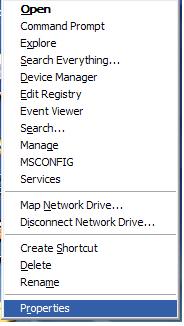
13. Which among the following features could be used to create a connection to a Shared Network folder?
Ans: Map Network Drive

14. Edit tracking changes are typically formatted in the following manner: (1) deletions—red strikethroughs, (2) additions—green and underlined, and (3) formatting changes are made bold in almost any other desired color. Where in Word 2007 could you set your own custom formatting options for tracking changes?
Ans: Select the Review ribbon and then select the triangle by Track Changes. In the drop-down menu, select "Change Tracking Options" and then set your formatting options in the Track Changes Options dialog box.

15. How will you insert text boxes for a printed form?
Ans: Select the Insert tab, in the Text group, click on Text Box and then select Draw Text Box.

16. To enter a symbol or special character into your document (to where the cursor is located), which of the following methods could you employ in Word 2007?
Ans: Open the Insert ribbon. Click Symbol in the Symbols group. A menu will appear with a small selection of symbols. If you don't see the symbol or character you'd like to insert, click More Symbols. Choose the special character (or symbol) that you want and then click Insert and click Close.

17. You are editing a figure using the Drawing Tools > Format options. Which among the following Shape Fill options in the Shape Styles group adds a solid color and transparency to a shape?
Ans: More Fill Colors...

18. State whether true or false:
When you save a document as a Web page, the textures and gradients are saved as JPEG files and the patterns are saved as GIF files.
Ans: True

19. Which among the following options is the reason of text deletion at the insertion point when you type a document?
Ans: The "overtype mode" is turned on in Word options.

20. What is meant by Enhanced ScreenTips?


Ans:  Enhanced ScreenTips are larger windows that display more descriptive text than a ScreenTip and can have a link to a Help topic.

21. This question is based upon the figure shown below

Refer to the given picture. Which of the following Line Numbers should be used when each page has to begin with the number 1?
Ans: Restart Each Page

22. Which keyboard shortcut could be used to switch to Draft View?
Ans: ALT+CTRL+N

23. State whether true or false:

The "Add Assistant" shape option in a SmartArt graphic is available only if an organization chart layout is chosen.
Ans: True

24. Which view(s) could be used to view the Equation placeholders in the Document Views group?
Ans: All of the above

25. State whether true or false:
Any changes that are saved to "Normal.dotm" will be applied to the documents that you create in the future.
Ans: True

26. State whether true or false:
Changing the Author property in the Document Information Panel of an existing document has no effect on the User name setting in the Word Options dialog box.
Ans: True

27. How will you set the default font so that every time you open Microsoft Word it will use the settings that you had selected?
Ans: Select the Home tab, and then click the Font Dialog Box Launcher. Select the font style and size. Click on Default... and then click Yes.

28. Which of the following line-spacing options sets fixed line spacing that Word does not adjust?
Ans: Doubled

29. How will you change the author name in an existing document?
Ans: All of the above

30. State whether true or false:
Microsoft Office programs store some additional information within the digital signature automatically that might not be visible in the current view document.
Ans: True

31. Which among the following options could be used to turn off the Office Clipboard?
Ans: All of the above

32. What does the command "Winword.exe /f MyDocument.docx" mean?
Ans: This command instructs Word to start and immediately open a file named MyDocument.docx.

33. Which among the following is an invalid character to include in a file name?
Ans: All of the above

34. State whether true or false:
Gridlines do not print when a document is printed.
Ans: True

35. Which keyboard shortcut inserts a hyperlink?
Ans: CTRL+K

36. Which among the following wildcards should be used to select any single character?
Ans: ?

37.  This question is based upon the figure shown below

 Refer to the given image. Which option should be selected to convert a professionally formatted equation into an equation on one line?

Ans: C

38. Which of the following is not a Content Control?
Ans: Chart

39. This question is based upon the figure shown below

Ans: Numbering

40. Which among the following is a correct way to make your file "Read-only?"
Ans: Click "Save As" from the Microsoft Office Button. Click on Tools and then click General Options. Select the Read-only recommended check box. Click OK. Click on Save.

41.  Which among the following options should be used to start a bulleted list automatically?
Ans: Type * (asterisk) and then press spacebar or the Tab key.


42. Which of the following can be the reason for the appearance of the red X, as shown in the picture?
Ans: All of the above

43. State whether true or false:
ASCII-formatted text contains no formatting information such as bold, italic, or fonts.
Ans: True

44.  State whether true or false:
New text animation effects can be applied in Microsoft Word 2007.
Ans: False

45. Which among the following options should be used to number the cells in a table?
Ans: Select the table cells that need to be numbered. On the Home tab, in the Paragraph group, click on Numbering.


46. Which of the following options repeats a table heading on subsequent pages?
Ans: Repeat Header Rows

47. Which keyboard shortcut could be used to check the spelling of a text file?
Ans: F7

48. Which among the following is not true regarding the use of a pie chart?
Ans: A pie chart should be used when there are more than seven categories.

49. This question is based upon the figure shown below

Refer to the given picture. Which of the following options turns off Enhanced ScreenTips but keeps the ScreenTips still visible?
Ans: B

50. Unlike the other types of styles (paragraph, character, linked, and table), predefined list styles are available when you first create a document in Word 2007.
Ans: False

51. This question is based upon the figure shown below

What is the maximum number of columns that can be created in the Columns dialog box as shown in the picture?
Ans: 13

52.  This question is based upon the figure shown below

Refer to the given image. In Picture1, axes appear on the left side. Which setting should you use to make them appear on the right side, as shown in Picture2?
Ans: Select the Axis Options tab in the Format Axis dialog box. Set the Axis labels: field to High.

53.  Which of the following two paragraphs is/are true for Word 2007?
(1)To show or hide formatting marks in your editing markup — on the Home ribbon, in the Paragraph group, click the Show/Hide button.
(2) The Show/Hide button will not hide all the formatting marks in the document if you selected those marks that are to be displayed at all times (such as paragraph marks, tab characters, hidden text, optional hyphens, object anchors, or spaces). To turn off any or all of these selected formatting marks, follow this procedure: Click the Microsoft Office Button and then click Word Options. Then Click Display. Under "Always show these formatting marks on the screen," clear the check boxes for any formatting marks that you do not want to show at all times in your documents.
Ans: Both (1) and (2)

54. This question is based upon the figure shown below
 In the given picture, the "Washout" option has been selected. What purpose does it serve?
Ans: It lightens the picture so that it does not interfere with the text.

55. The default installation of Word 2007 includes several built-in character styles. Which of the following is NOT one of the default, built-in character styles:
Ans: Special Emphasis

56. What steps should be followed to replace a shape with other shape?
Ans: Select the shape to be changed. Select the Format tab; use the "Change Shape" button in the Shape Styles group.

57. Just as in Word 2003 or prior Word versions, the default standard view for Word 2007 is the Draft view (and is still also called the Normal view in Word 2007):
Ans: False

58. This question is based upon the figure shown below

 What is the purpose of the "Demote" button as shown in the diagram?
Ans: It increases the level of a selected bullet or a shape.

59. Which feature(s) should be selected in order to find and remove hidden data and personal information in Office documents?
Ans: Document Inspector

60. Which keyboard shortcut is used to make the text size smaller?
Ans: CTRL+SHIFT+<

61.  Which among the following options will you use to add a command to the Quick Access Toolbar?
Ans: All of the above

62. Which option(s) should you select to remove a chart or axis title from a chart?
Ans: To remove an axis title, select the Layout tab. In the Labels group, click on Axis Titles, click the type of axis title, and then click None.

63.  Which among the following macro settings is meant for developers only?
Ans: Trust access to the VBA project object model.

64. State whether true or false:
A building block can be added to as many galleries as you want.
Ans: True

65. Which of the following is/are true about phishing?
Ans: It is an online fraud technique used by criminals to lure users into disclosing their personal in.

Saturday, March 2, 2013

Joomla 1.5 oDesk Test Answer 2013


1) The index.php file is a combination of HTML and PHP code.
Odesk test answer: True

2) What is the default super administrator account for Joomla called?
Odesk test answer: Administrator


3) Which of the following PHP directives are important to Joomla execution to define an alternate compression library if the standard library is not available?
Odesk test answer: extension_dir

4) Which of the following files is archive and contains the actual CB component that you must install into Joomla while downloading CB?
Odesk test answer: com_comprofiler

5) Which option will you choose to set the site metadata for the installed website?
Odesk test answer: Global Configuration

6) What will happen if we set the SSL enabled option to On?
Odesk test answer: This option will make the link from the menu begin with an https://

7) The core editor events apply to plug-ins that provide editor functionality such as TinyMCE or XStandard Lite.
Odesk test answer: True

8) Which PHP file does the index.php file load to provide the menu bar to the administrator interface?
Odesk test answer: Toolbar.php

9) Which of the given database systems is supported by Joomla?
Odesk test answer: Mysql
10) Which of the following is the default editor of Joomla?
Odesk test answer: TinyMCE
11) Joomla provides an abstracted method called getEscaped() that returns the escaped string regardless of the target database.
Odesk test answer: False

12) From which package are the classes (i.e JSite, JAdministrator and JInstallation) which make up the Joomla CMS application extended?
Odesk test answer: Installer

13) What is not true about JoomlaXplorer?
Odesk test answer: None of the above

14) Which of the following is a system event?
Odesk test answer: OnDisplay

15) Which Joomla file provides the central logic of the template, including any module and component display?
Odesk test answer: Index.php

16) When will you use SMTP authentication mail settings?
Odesk test answer: When you want to use an internal mail server

17) What do you understand by the type of error?
Odesk test answer: It means that STRICT_ALL_TABLES is enabled

18) Which path variable holds the path of the currently executing application?
Odesk test answer: All of the above

19) Which user events occur with plug-ins that are installed for the front end of the system?
Odesk test answer: Both a and b

20) Which type of positioning elements define a concrete area such as a p, td, div or table in a CSS file?
Odesk test answer: Block elements

21) Which of the following files does the "/includes" directory not contain?
Odesk test answer: None of the above

22) Which option will you select to install or to add the module to your website?
Odesk test answer: C

23) Why does Joomla use templateDetails.xml files?
Odesk test answer: All of the above

24) Which of the following events is activated after content rendering is complete for content type plug-ins?
Odesk test answer: OnAfterDisplayContent

25) All the Joomla settings are contained within a PHP class called JConfig.
Odesk test answer: True

26) In which PHP file is the central configuration data for Joomla contained?
Odesk test answer: configuration.php

27) What is not true about the MD5 hash value?
Odesk test answer: Each password in Joomla is stored as a MD5 hash value

27) There are two root classes for the Joomla framework: JFactory and JVersion.
Odesk test answer: True

28) Which option will you select to find unpublished articles?
Odesk test answer: Article manager

29) What do you understand from the following code?
Odesk test answer: SQL statement is executed against the Joomla database to find empty data fields

30) Which SEO settings will you activate to make Joomla article URL shown in picture A appear as shown in picture B?
Odesk test answer: B

31) In which option are errors, warnings and references logged?
Odesk test answer: None of the above

32) Which type of files can media manager not upload?
Odesk test answer: None of the above

33) Which among the following switches display the current version of PHP?
Odesk test answer: v

34) The Joomap extension uses the style-sheets from the currently selected default template to display the sitemap in the site style.
Odesk test answer: True

35) Which type of server technology is used by Joomla?
Odesk test answer: All of the above

36) Which of the following is not true about the FrontPage Manager?
Odesk test answer: You cannot select your content for the FrontPage from all the contents

37) What happens if the Text Separator Field is left empty while using the breadcrumbs module in the module manager?
Odesk test answer: None of the above

38) Which of the following support libraries must you include when you are doing a manual compile of PHP to use with Joomla?
Odesk test answer: All of the above

39) What is the role of the template metadata file in the system?
Odesk test answer: It contains the basic authorship information

AutoCad 2007 oDesk Test Answers 2013


01.Question:  You can attach a digital signature to which of the following file types?
ANS: All of the above

02.Question: Which option is not available in AutoCAD2007 to repair a damaged drawing file?
ANS: Check

03.Question:  Which of the following settings are saved when you name and save a view?
ANS: All of the above

04.Question:  Which option is disabled when a nested reference is selected as shown in the given picture?
ANS: D

05.Question:  Which of the following is not a type of action override?
ANS:  C. Angle offset

06.Question:  Which command is used on picture A to create a mesh or to acheive the result of picture B?
ANS:  C. RULESURF

07.Question:  Which option you will choose to create solid filled areas?
ANS:  C. Wide polylines or donuts

08.Question:  Dimensional input is available for ARC, CIRCLE, ELLIPSE, LINE, and PLINE.
ANS:  A. True

09.Question:  In what type of text can fields not be inserted?
ANS: C. Tolerances

10.Question:  Which of the following option can not be offset?
ANS: C. Construction lines (xlines) and rays

11.Question:  What dose b stand for in the given example when you tum the automatic save option on as shown in the given picture?
ANS: C. b is a random number

12.Question:  Which type of hatching style is shown in the given picture?
ANS: C. Ignore

13.Question:  What is not true about live sectioning behavior?
ANS: C.

14.Question:  Plot styles are not available for objectswith the Jitter edge modifier applied.
ANS: B. False

15.Question:  All settings for the sun encept geographic location are saved per drawing, not per viewport.
ANS: A. True

16.Question:  Break, chamfer, fillet, lengthen and offset editing comands can be used on Multilines.
ANS: B. False

17.Question:  Which keyboard shortcut will you select to toggle polar tracking?
ANS: C. F9

18.Question:  Tool palaette files have an.xtp file extension.
ANS: B. False

19.Question:  When you use grips to edit an object, what type of information dose the dimensional input tooltip display?
ANS: D. All of the above

20.Question:  When dose a temporary history entry state occur?
ANS: C. Both a and b

21.Question:  Which among the following types of coordinates displays update as you move the cursor?
ANS: D. All of the above

22.Question:  What can you do with the DesignCenter?
ANS: C. You can update a block definition

23.Question:  In which conditions, can you make a layer, the current layer?
ANS: C. When it is the default layer

24.Question:  As shown in the picture, the symbol for projected tolerance is preceded by a height value, which specifies the minimum projected tolerance zone.
ANS: B. False

25.Question:  Which option you will choose to show or hide light glyphs?
ANS: C. Click Tools menu > Palettes > Properties

26.Question:  Which of the following properties is not included within the Reference Manager?
ANS: D. Found path

27.Question:  Which of the following is not part of the Information title block?
ANS: C. Size of the drawing

28.Question:  Which type of grip tool is shown in the given picture?
ANS: D. None of the above

29.Question:  Which of the following layer properties is not checked by the layer plug-in?
ANS: A. Plot style mode

30.Question:  When can an Xref icon displayed in the lower right comer of the application window as shown in the picture?
ANS: A. When Xrefs are attached to the drawing

31.Question:  Which of the following is not a type of dimensioning?
ANS: C. Ordinate

32.Question:  Which of the following is the default mode state for shadows?
ANS: D. None of the above

33.Question:  Which of the given options displays the layer properties manager in the given picture?
ANS: D. None of the above

34.Question:  Which of the following wild card characters you will use to match any single character?
ANS: D

35.Question:  Autocad dose not provide Plotter drivers to which type of files?
ANS: B. Raster file formats

36.Question:  Menu swapping is not supported for which of the following interface elements?
ANS: D. None of the above

37.Question:  Which option meanes that the sheet is in a special state as shown in the given picture?
ANS: A. A

38.Question:  Which type of the section object grip dose option A display, as shown in the picture?
ANS: A. Base grip

39.Question:  The attribute extraction wizard creates a file with a.blk file extension.
ANS: A. True

40.Question:  Which of the following types of files can be used as maps?
ANS: C. PNG

microsoft excel 2007 oDesk test answer 2013


SET 01 
Question: You have created a worksheet which consists of confidential data. You want that these values, although present in the worksheet, should remain hidden and as a result the cells containing this data should appear blank in the worksheet. Which method will help you do this?
Ans:   Select the cells, open the Window menu and click on Hide

 
Question: The figure shows a view of the Standard Toolbar. What function is performed by the button marked by the letter 'Z'?
Ans:   It copies the formatting properties from one cell to another

Question: The figure shows the AutoFit Selection menu option. What function does it perform?
Ans:   It automatically resizes the column height and width to the minimum necessary to fit the contents of the selected cell

Question: The figure shows a view of the Standard Toolbar. What function is performed by the button marked by the letter 'A'?
Ans:   It is used to add a hyperlink
 
Question: How does the AutoComplete feature in Excel help you save time?
Ans:   It automatically completes abbreviated words  

Question: Which of the following options would be used if you need to insert a 77889867810070809 number in a cell?
Ans:   Apply the Text Format to empty cells, and then type the numbers

Question: What is the quickest way to select all the columns on a worksheet?
Ans:   Click on the gray rectangle on the upper left corner of the worksheet where the column headings and row headings meet

Question: Suppose the value in cell A1 is John and B1 is Smith then which of the following function you will use to get the John_Smith in C1 cell?
Ans:   A_B

Question: How can you select all the blank cells in your worksheet?
Ans:   This must be done manually as it is not automated through any built-in feature

Question: Which of the following functions would return a value of 8?
Ans:   b and c

Question: You select the row headings 10, 11 and 12 and then choose the menu option Insert->Rows. What will happen?
Ans:   3 new rows will be inserted after row 9

Question: The figure shows a view of the Drawing Toolbar. What function is performed by the button marked by the letter 'X' ?
Ans:   It inserts a Diagram or Organization Chart in the worksheet

Question: When using Document Workspaces, you cannot work directly on the Document Workspace copy, but you can work on your own copy which you can update periodically with changes that have been saved to the copy on the Document Workspace site.
Ans:   TRUE
 
Question: The figure shows an Excel worksheet. If you want to freeze the row showing the months (row 1) and the column showing the products (column A), what should you do?
Ans:   Select the cell A1 and click on Freeze Panes under the menu Window->Freeze Panes
Question: You start Microsoft Excel and you do not want it to automatically run a macro upon starting. What will you do?
Ans:   Hold down the CTRL key during startup

Question: Which of the following Date and Time function you will use to return the serial number of the last day of the month before or after a specified number of months?
Ans:   DATEVALUE

Question: The figure shows a view of the Standard Toolbar. What function is performed by the button marked by the letter 'Y'?
Ans:   It adds up the values in the selected cells

Question: Which of the following errors appears when an invalid argument is passed while converting a number from one number system to another system?
Ans:   #N/A

Question: Which of the following function you will use to find the highest number in a series of numbers?
Ans:   MAX(B1:B3)

Question: You have entered 4/6 as data in a cell without applying any formats to it. By default, Excel will treat this data entry as a:
Ans:   Date

Question: AutoFilter drop-downs are automatically added in the header row of a list when the list is created.
Ans:   TRUE

Question: What does the NOW() function returns?
Ans:   Returns the serial number of the current date and time

Question: Which toolbar is shown in the figure?
Ans:   Forms toolbar

Question: When you clear the contents from a cell, the formatting of the cell is also lost.
Ans:   FALSE

Question: You define a print area in your worksheet, but later you select a smaller range of cells to print and then click Selection under the menu File->Print->Selection. What will happen?
Ans:   b
Question: What will be the output of the function IF(ISNA(MODE(B1:B4)),0,MODE(B1:B4)) when it is applied to the data series given below?
Ans:   #N/A  

SET 2
Question: Which among the following is not true regarding a calculated column?
ans: d. Additional formulae cannot be entered in a calculated column as exceptions
Question: when a part of a formula is replaced with its calculated value, it cannot be restored.
ans: a. True.

Question: When you sign the stamp signature line in an office document, you add both a visible stamp and a document signature.
ans: a. True
Question: Refer to the given image, what will be the result if the formula =B3&”, ”&A3 is applied to the given table?
ans: d. Both b and c

Question: How will you reverse the direction of a Smart art graphics?
ans: c. Under SmartArt tools, on the Design tab, in the Create Graphic group, click on Right to Left

Question: Which of the following chart have no axes?                     
ans: c. C-both a and b

Question: Which of the following is not true regarding column width?
ans: d. all of the above are true

Question: Which chart type is displayed in the given picture?
ans: b.A surface chart

Question: What does the red icon indicate as shown in the given picture?
ans: b.  it tells the user that the document contains signatures

Question: What does the screen tip displaying “Showing all” mean?
ans: a. It means that a filter has been applied.

Question: Which chart displays axes but can not display axis titles?
ans: a. Radar chart

Question: Which file format is typically used to remove printer corruption?
ans: c. SYLK format

Question: Which of the following methods would you follow to remove subtotals?
ans: a. On the Data tab, in the Outline group, click on Subtotal. The subtotal dialog box is displayed. Click Remove all

Question: When does triangle appear in the Top-left corner of the cell, as shown in the picture?
ans: c. When there is an error in the formula
 
Question: Which lookup function should be used when the comparison values are located in a column to the left of the data that is to be found?
ans: b. VLOOKUP

Question: Which scoping method should be used to conditionally format a set of fields in the values area for all levels in the hierarchy of data?
ans: c. Scoping by value field

Question: Where can the “Show all comments” command be found?
ans: c. On the Review tab

Question: Which of the following is not true about an offline cube file
ans: b. The file format for an offline cube file is .CUE

Question: What is the significance of the red symbol at the top right corner of the cell, as shown in the picture?
ans: b. It signifies that the cell contains a comment.

Question: Which of the following is not true regarding naming a cell?
ans: a. Names are case sensitive.

Question: Which of the following options should be used to create a connection to a shared network folder, as shown in the picture?
ans: a. A    (MAP NETWORK DRIVE)

Question: Which of the following charts shows numerical values on the vertical (value) axis and textual groupings (or categories) on the horizontal axis?
ans: c. Area charts

Question: Which of the following options would you choose to clear a PivotChart report?
ans: a. On the Analyze tab, in the Data group, click on Clear and then click “Clear All”.

Question: Which of the following wildcard characters can be used as comparison criteria for Text Filters?
ans: d. All of the above.

Question: Which tab should be used to display or hide axes?
ans: b. Layout tab

Question: When would you use smart graphic?
ans: a. List information b. create a matrix illustration c. Show a relationship between parts, such as overlapping concepts

Question: Which tab is required to work with Macros?
ans: b. Developer tab. e. View tab

Question: Referring to the given image, point out which option should be selected to automatically save a backup copy of a workbook.
ans: b. B General options

Question: Which keyboard shortcut re-calculates all formulas in all open workbooks, regardless of whether or not they have change3d since the last time?
ans: d. None of above.

Question: Refer to the given image Which line style option should be used to specify the style used for the end  of the line?
ans: c. C

Question: Which of the following is not true about the Watch Window?
ans: c. There can be two Watch windows per cell.

Question: How would you select an entire PivotalTable report?
ans: b.  On the Options tab, in the Actions group, click Select, and then click Entire PivotTable.

Question: A Macro can be digitally signed.
ans: a. True

Question: What would be the result, when =T(A4) is applied on the given table?
ans: a. The text TRUE is returned

Question: When you freeze panes, you select specific rows or columns that remain visible when scrolling in the worksheet.
ans: a. True

Question: Which among the following options displays Legend entries in the given picture?
ans: c. C

Question: What is the purpose of using the Keep text flat option, as shown in the picture?
ans: a. It prevents the text inside the wordart from rotating when rotate wordArt is rotated.

Question: Which of the given methods would you follow to add an alternative text to a picture?  
ans: a. Right-click the picture, click Size and Properties.Click the Alt Text tab, and then in the Alternative text box, enter your text.

Question: Some data is to be refreshed in an imported XML file. Where can the command on the Ribbon be found?
ans: c. On the Developer tab

Question: Refer to the given image Which of the following password options uses an encryption method?
ans: c. Both a and b

SET 3
 
Question: Refer to the given picture, which option causes the last row in the table to appear and displays the word Total in the leftmost cell?
ans: b. B  (total row)

Question: What is the option on the Document Inspector that finds the content type information?
ans: c.  Document Properties and Personal Information

Question: How will you find cells with data validation?
ans: a. On the Home tab, in the Editing group, click the arrow next to Find & Select,, then click Go -To Special. Click on Data Validation, and then click All

Question: For XY (scatter) and bubble charts, error bars for the x values, the y values , or both can be displayed.  
ans: a. true

Question: How should blank cells be inserted on a Worksheet?
ans: c. Both a and b

Question: Case-sensitive sorting of text in Excel2007 can be performed.
ans: a. True

Question: Which of the following is true about a freeform shape?
ans: d. All of the above is true

Question: Which keyboard shortcut should be used to enter the current time?
ans: b. CTRL+SHIFT+:

Question: Deleting the PivotChart report automatically deletes the associated  PivotTable report.
ans: b. False

Question: Which of the following is a default method of a PivotTable report for scoping the conditional format of a fields in the values area?
ans: a. By selection

Question: Which method will you use to update table data from a Sharepoint list?
ans: c. In the Design tab, On the External Data Tools group, Click Refresh

Question: How will you display the Go To dialog box?
ans: b. You will press F5

Question: Which part of the formula displays references in the given picture?
ans: b. B

Question: Which of the given Document properties includes both file system properties and statistics that are maintained by Office programs for the user?
ans: a. Automatically updated properties

Question: Which keyboard shortcut should be used to minimize or restore the ribbon?
ans: c. CTRL+F1

Question: When the table headers are turned off, the table header Autofilters and all other applied filters are removed from the table.
ans: a. True

Question: If a SmartArt graphic is converted to individual shapes, it is not possible to convert them back to the SmartArt graphic
ans: a. True

Question: Which of the following operators is not a type of calculation operator?
ans: d. equation

Question: Which Consolidate option would you choose when you want to arrange data in all the worksheets in identical order and location?
ans: a. Consolidate by position

Question: Which option would you choose to display a list of formula used in the current PivotTable report?
ans: c. On the Options tab, in the Tools group, click on Formula, and then click “List Formula”

Question: Which of the given Document properties includes both file system properties and statistics that are maintained by Office programs for the user?
ans: Automatically updated properties  

Question: When does the error, as shown in the picture, occur?  
ans: d. All of the above.

Question: Refer to the given, What is the purpose of the cell denoted as 'A' in the worksheet?
ans: a. It selects all the cells in the worksheet.

Question: Refer to the given image, which formula should be written on the given table to display "Nancy Davolio"?
ans: c. =PROPER(A2)   

Question: How would you assign a Macro to a graphic
c.  On the worksheet, right-click on the graphic, then click "Assign Macro" on the shortcut menu. In the Macro name box, click on the macro that you want to assign.

Question: No data is deleted when an outline is hidden or removed.  
ans: a. True.

Question: Refer to the given image, which of the following Fill options should be used to add color and transparency to a shape?  
ans: a. A    (No fill)

Question: Which among the following settings is the default macro setting?
ans: c. Disable all macros with notification.

Question: Which type of additional information is stored within the digital signature?
ans: d. All of the above.

Question: When 'a' or 'p' is not typed after the time in Worksheet cells, what does Excel enter the default time as?      
ans: d. It enters the time as AM.

Question: Which of the following is not a valid file extension in which an Excel file can be saved?
ans: c. PXL

Question: When would the data validation command be unavailable on the data tab?   
ans: d. All of the above.
SET 4
  Question: How can a chart be modified?
ans: All of the above

Question: This question is based upon the figure shown below When does
ans: When there is an error in the formula


Question: Which database function estimates variance based on a sample from selected database entries?

ans: DVAR


Question: Which chart displays axes but cannot display axis titles?
ans: Radar chart


Question: How will you reverse the direction of a SmartArt graphic?

ans: Under SmartArt Tools, on the Design tab, in the Create Graphic group, click on Right to Left

 
Question: Which database function estimates variance based on a sample from selected database entries?

ans: DVAR


Question: How would you locate the last cell on a worksheet?

ans: Click anywhere in the worksheet, and then press CTRL+END


Question: Which Consolidate option would you choose when you want to arrange the data in all the worksheets in identical order and location?
ans: Consolidate by position


Question: Which of the following options is not available on the Status bar?

ans: Start mode 
Excel 2010 oDesk Test Answer 2013


Q1: figure shows a view of the Standard Toolbar. What function is performed by the button marked by the letter 'Z'? 

Ans: It copies the formatting properties from one cell to annother 

Q2:The figure shows the AutoFit Selection menu option. What function does it perform? 

Ans:It automatically resizes the column height and width to the minimum necessary to fit the contents of the selected cell 

Q:How does the AutoComplete feature in Excel help you save time? 

Ans:It automatically completes abbreviated words


Q:The figure shows a view of the Standard Toolbar. What function is performed by the button marked by the letter 'A'? 

Ans:It is used to add a hyperlink 

Q:Which of the following options would be used if you need to insert a 77889867810070809 number in a cell? 

Ans:Apply the Text Format to empty cells, and then type the numbers 

Q:Suppose the value in cell A1 is John and B1 is Smith then which of the following function you will use to get the John_Smith in C1 cell? 

Ans:A_B 

Q:How can you select all the blank cells in your worksheet?


Ans:This must be done manually as it is not automated through any built-in feature 

Q:What is the quickest way to select all the columns on a worksheet? 


Ans:Click on the gray rectangle on the upper left corner of the worksheet where the column headings and row headings meet


Q:The figure shows an Excel worksheet. If you want to freeze the row showing the months (row 1) and the   column   showing the products (column   A), what should you do? 


Ans:Select the cell A1 and click on Freeze Panes under the menu Window->Freeze Panes 

Q:Which of the following functions would return a value of 8? 

Ans:b and c 

Q:You select the row headings 10, 11 and 12 and then choose the menu option Insert->Rows. What will happen? 

Ans:3 new rows will be inserted after row 9 

Q:The figure shows a view of the Drawing Toolbar. What function is performed by the button marked by the letter 'X' ? 

Ans:It inserts a Diagram or Organization Chart in the worksheet


Q:When using Document Workspaces, you cannot work directly on the Document Workspace copy, but you can work on your own copy which you can update periodically with changes that have been saved to the copy on the Document Workspace site. 

Ans:TRUE


Q:You have created a worksheet which consists of confidential data. You want that these values, although present in the worksheet, should remain hidden and as a result the cells containing this data should appear blank in the worksheet. Which method will help you do this? 

Ans:Select the cells, open the Window menu and click on Hide


Q:Which of the following   Date and Time   function you will use to return   the   serial number   of the last day of the month before or after a specified number of months? 

Ans:DATEVALUE


Q:The figure shows a view of the Standard Toolbar. What function is performed by the button marked by the letter 'Y'? 

Ans:It adds up the values in the selected cells


Q:Which of the following errors appears when an invalid argument is passed while converting a number from one number system to another system? 

Ans: a


Q:Which of the following function you will use to find the highest number in a series of numbers? 

Ans:MAX(B1:B3) 


Q:You have entered 4/6 as data in a cell without applying any formats to it. By default, Excel will treat this   data entry   as a: 

Ans:Date


Q:You define a   print   area in your worksheet, but later you select a smaller range of cells to   print   and then click Selection under the menu File->Print->Selection. What will happen? 

Ans:b


Q:What will be the output of the function IF(ISNA(MODE(B1:B4)),0,MODE(B1:B4)) when it is applied to the data series given below? 

Ans: a


Q:AutoFilter drop-downs are automatically added in the header row of a list when   the list   is created. 

Ans:true


Q:What does the NOW() function returns?


Ans:Returns the serial number of the current date and time 

Q:You start Microsoft Excel and you do not want it to automatically run a macro upon starting. What will you do? 

Ans:Hold down the CTRL key during startup


Q:Which toolbar is shown in the figure? 

Ans:Forms toolbar


Q:When you clear the contents from a cell, the formatting of the cell is also lost. 

Ans:FALSE